The Soulglobe
Your results, as a place
Everything you find out about yourself on Soulflake, turned into a little snowy world you can walk into, with the people you’re connected to.
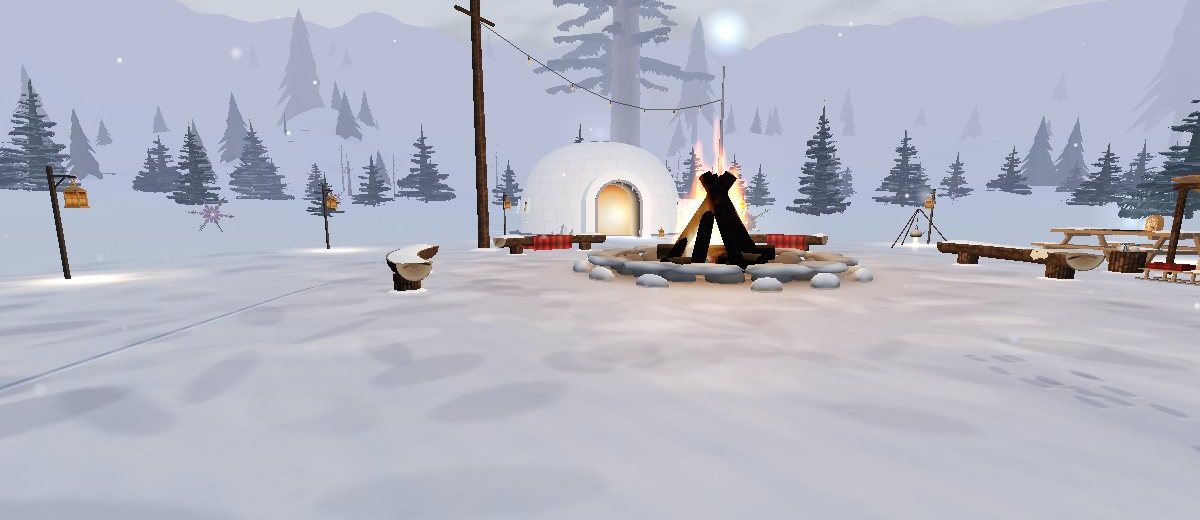
The Soulglobe is a snow globe you can step inside. In the middle of the valley is a campfire, and beside it is your igloo. It’s built from your Soulflake: your six traits shape its ice spikes, your Soulflake flies in glass on the tall pole out front, and every facet you fill in sets another line of light into its shell.
Walk in and you’re in your own hall, with a doorway for each facet of you. Once you’ve answered some of a facet’s questions, its doorway opens into a room made from what you found out there. The ones you haven’t explored yet stay frosted over, so the place fills in as you go. It never really finishes, a bit like you.
The idea behind it
Soulflake starts with you. Knowing yourself a little better is worth it on its own, and it’s also the first step to understanding the people around you. The Soulglobe is that same idea, as somewhere you can go.
- You see yourself differently. Reading a result is one thing. Walking through a room built from it, with your strongest traits standing tallest in your hall, makes it stick in a way a page can’t. Your whole self, laid out as a home.
- Your people are there. Everyone you’re connected with has an igloo around your fire, shaped by what they share with you. Step into theirs and wander through who they are. When they’re in at the same time, you see each other walking around, and you can chat, talk out loud and throw snowballs.
- Somewhere to stop and think. Deep in the woods, the Oracle answers one question with an answer made from your Soulflake. High in the east woods, the Growth Temple walks you through a few quiet minutes: a breath, one question drawn from your own results, and one small step for today.
- And it’s fun. Slopes to ski, two frozen rivers to ride, an arcade, a stage where you’re the DJ, and a diving board at the top of a very tall tree. Play is part of it. Calm is too.
Your first five minutes
The first time you visit, a short welcome shows you around, with a small warm light floating ahead of you toward each thing it mentions. Here’s the same walk, step by step, so you know what to expect.
- Step inside. Look for the little snow globe right beside the Soulflake name at the top of every page, and tap it. It glows when someone is inside, and turns violet when one of your people is. Each facet page also has a Step inside button that takes you straight to that facet’s room. On your first visit of the day you fall in as a snowflake from high above the globe, pass through its glass in a ripple of frost, and drift down in a slow, swaying spiral to land beside the fire, facing it, with your igloo beyond. That takes about eight seconds, and about three on later visits that day. Any click, tap or key skips it, and with reduced motion you simply fade in at the fire. Invite links and the buttons on other pages still bring you straight to their own spot.
- Find your feet. On a computer, glide with W A S D or the arrow keys, and hold Shift to go faster. Click the world, then just move the mouse to look; Esc lets go of the mouse. On a phone, push the stick with your left thumb to walk, drag anywhere else to look, and tap a name to see what it is. A small Getting around card shows this the first time.
- Go into your igloo. It’s the one beside the fire with your Soulflake flying on its pole. Walk through the door and you’re in your hall. In the middle stands your Soulflake, with six crystal pillars around it, each as tall as that trait is strong.
- Walk into a room. Around the wall is a doorway for each facet. The open ones lead into rooms made from your results, each built to suit its facet: your values as a snow chapel, in the order you hold them; your mood as a still lake under the night sky; your strengths as a maker’s hall; your story as a passage through your years; your favorites on the walls of a cozy lodge den. A frosted doorway tells you what opens it, like “Your first reading opens this room.”
- Tap what you see. Anything in a room opens a small card about it. The card has a link to that facet on the site, so you can read the full results. It works the other way too: when you come back to a page from the Soulglobe, its button says Back to your Strengths room (or whichever you were in) and drops you right where you were.
- Find your people. Their igloos sit around your fire. An igloo glows warm while its owner is online and stays dark while they’re away. Anyone in the Soulglobe with you has a faint beam of light rising from them, so you can spot them from afar. The Snowfolk you’ll see around camp are the valley’s own residents, not people, and they have no beam. Tap someone’s name to play Frost with them, challenge them to a game of Balls of Flurry, or ask to connect.
- Join someone. If one of your people is in the Soulglobe, tap Join by their name in Chat to go to them. Type and your words show over your head for a few seconds; hold V on a computer (or the mic button on a phone) to talk out loud. Walk into their igloo and their rooms show what they share with you.
- Open the menu. The three dots at the top open the Soulglobe menu: the Map, Play Frost, Balls of Flurry, Invite someone here, Take a picture, and Show me around, which runs the welcome again. Standing in a facet room, it also offers Compare this room, which takes you to the same room in one of your people’s igloos, and back.
- Leave whenever you like. Tap the × at the top right, or press Esc on a computer, and you’re back on the page you came from. Your igloo grows as you answer more on Soulflake, so it’s worth a look after your next questionnaire.
You can walk in without an account. To see your people there, invite someone, or ask the Oracle, you’ll need to be signed in.
Places to visit
Lantern trails lead out from camp. A map board at Base Camp shows where everything is, with “You are here” on it, the edge of the world round it all, and the deep woods marked as a place to keep out of after dark. Beside it a Things to do sign lists what there is to do here; tap a line and lanterns light the way there. The Map in the menu (M on a computer) is the whole Soulglobe drawn from above, with you on it: pick any place you’ve found and Show the way lays a trail of small warm lanterns ahead of you, with a little arrow at the top pointing the way. You get there on your own feet or skis; nothing flies you.
- Base Camp
- Your fire, your igloo and your people’s, a Frost table, an old radio, the map board and the Things to do sign. Light your fire and it flares over the valley for twenty minutes, so your people see the glow and can walk over.
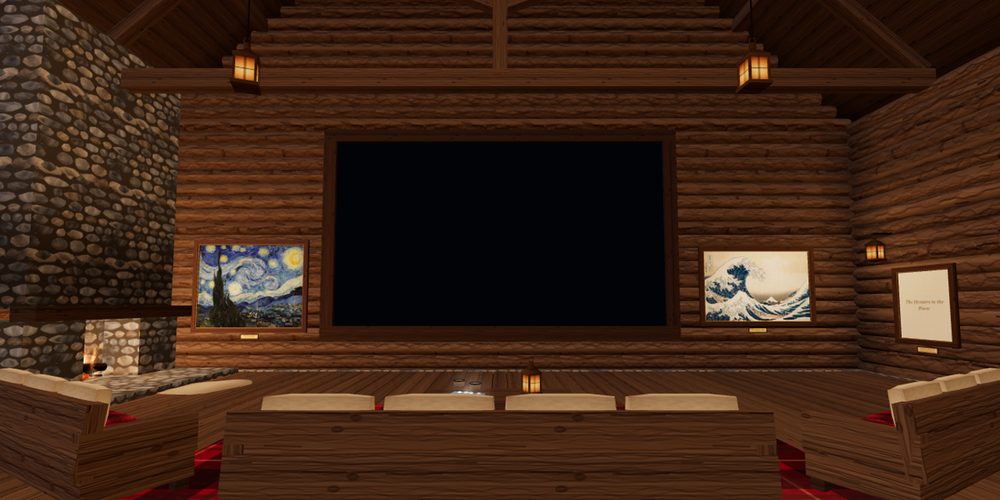
- The Rec House
- A place to hang out together. Put a YouTube link on the big screen and everyone in the house watches with you. Through the opening on the right is the arcade.
- The stage
- Over the ridge, at the end of the lantern trail through the woods. Its lights, screen and lasers follow the music.
- The Oracle
- Down a side trail, deep in the woods, in a candlelit temple.
- The Growth Temple
- On a rise in the east woods, looking back down to the camp: a ring of pillars around a stone pyramid.
- The great tree
- The oldest tree in the valley, standing in the frozen pond. It’s hollow: a lift inside takes you up to a lookout and a little treehouse in its crown, with a diving board off the deck.
- The frozen pond
- Glide out onto the ice and keep sliding. The moon shows in it if you find the right spot.
- The old lookout
- A watchtower up on the rock. From the top you can see the whole globe.
- The frozen falls
- A waterfall the cold caught on its way down, up in the west hills, with a quiet cave behind it.
- The hot spring
- Steam rolling off blue water in the south-east woods. Somewhere quiet to be with someone, away from the fire.
- The glowing grove
- Ice that holds a little light of its own, hidden in the trees. Nobody quite knows why it glows.
Things to do
Look inward
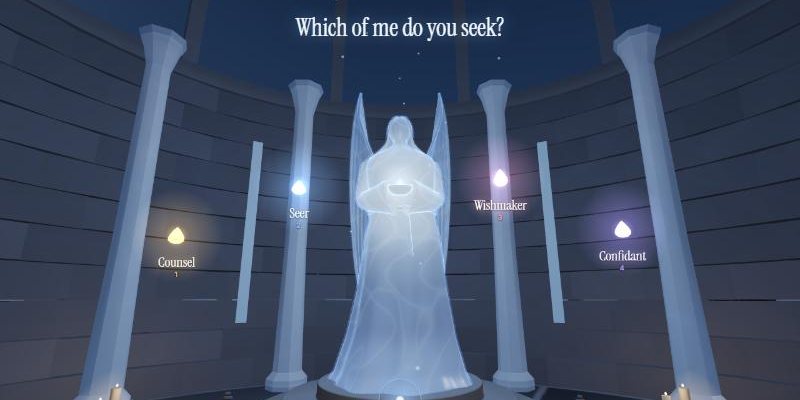
- Ask the Oracle. Walk up to her and she asks which of her you seek. Four flames hang around her: the Counsel, the Seer, the Wishmaker and the Confidant. Pick one, then ask your question out loud (hold V, or the glowing mark) or write it. Her answer, made from your Soulflake, appears as words in the air a phrase at a time; Hold the scroll to read the whole thing at your own pace. Each answer burns down one of the candles on her altar, and the candles show how many questions you have left this week. What you ask her goes only to her, never to anyone near you.
- Sit at the Growth Temple. Step inside the ring of pillars and lines appear between them, picked from your own results. Tap the stone tablet by the bench to sit for a few quiet minutes: a breath (in for four, out for six), one question drawn from your results, one small step for today, and a note to yourself if you like. Notes stay in this browser.
- Walk through your rooms, and theirs. Each room is one facet of you. In your people’s igloos, the rooms show what they share with you, and Compare this room moves you between your room and theirs.
Play
- Ski. Hold Space (or Jump on a phone) as you land on a slope and you’re skiing. Lips in the snow become ski jumps.
- Ride the river run. A long frozen run from the pond, round the camp’s west side and down to the creek’s pool. Let the current carry you, or hold Space to go fast, and fly off the ramp at the end. The bridges are high enough to slide under.
- Ride the Lazy river. A second frozen run leaves the great tree’s trailhead and loops the whole valley, about a mile, past a frozen fall and round again. Press forward to go faster, pull back to slow down.
- Fly the Growth Temple. Stand on the plate at the top of its pyramid. Rings rise and a tone climbs, then it shoots you up to the top of the globe, and you glide down and land wherever you steer.
- Bounce off the diving board. Ride the lift up the great tree and jump on the board’s end. Hold Space as you land and let go at the bottom of the dip for a bigger launch, and a quiet “Perfect!” if you nail it.
- Use the jetpack. On a computer, hold the right mouse button to fly. A bar shows what’s left in the tank.
- Throw snowballs. Once the mouse is yours, click to throw; hold to charge a Glowball, thrown harder and straighter, glowing in your colour and lighting the snow as it goes. On a phone, press and hold.
- Play the arcade in the Rec House. Dig Douglas: tunnel through the frozen hill under the Soulglobe to dig out the lost shards. Aurora Run: a ski race round the whole bowl through fourteen rings of aurora light, racing the ghost of a fast run, for a medal. Balls of Flurry: a ring forms on the snow right where you are, best of three, against Flurry (who gets better each time you win) or against a real person.
- Be the DJ. At the stage, tap the decks and pick a station. The screen, the lights and the lasers follow your music, and the Snowfolk come running to dance. Anyone in the Soulglobe can walk over and join you.
- Play Frost at the table by the fire, the same game as on the site.
Share it
- Invite someone here. Make a link that brings them right to where you’re standing.
- Take a picture. Save or send a snapshot of your Soulglobe.
- Earn achievements. The Soulglobe has fourteen of its own on your Achievements page, from Shake the globe (your first step inside) to Perfect! off the diving board and a medal in Aurora Run.
Controls
It works on phones and computers. Phones and lighter laptops get a lighter version, so it stays smooth.
| Computer | Phone | |
|---|---|---|
| Move | W A S D or the arrow keys; hold Shift to go faster | Push the stick with your left thumb |
| Look | Click the world, then move the mouse; Esc lets go | Drag anywhere else |
| Go somewhere | Click a name or a place; middle click walks you there | Tap the snow or a name |
| Jump | Space | Jump button |
| Ski | Hold Space as you land on a slope | Hold Jump as you land on a slope |
| Jetpack | Hold the right mouse button | Jet button, in a game of Balls of Flurry |
| Snowball | Click; hold to charge a Glowball | Press and hold |
| Use | E, on what’s in the middle of the screen | Tap it |
| Talk | Enter to chat, hold V to talk | The chat box, or hold the mic button |
| Leave | Esc, or the × at the top right | The × at the top right |
On a computer, Full screen (in the bar at the top) makes it feel like a game. In full screen, Esc first lets go of the mouse rather than leaving.
Who sees what
- Your igloo is built only from what you already share. What your connections see of your igloo and its rooms comes from what you already share with them on the site, and nothing more. Switch Taste off for someone, for example, and your Taste room shows them nothing.
- People you aren’t connected with see only your first name, a plain igloo and a plain crystal, never your Soulflake or anything from your results.
- Nothing you do in there is kept. Where you’re standing goes out live to the people in there with you, but your position, what you type and your voice clips aren’t saved anywhere.
- You’re in charge. Mute, block or report anyone. Turn off Meet people in the Soulglobe in Settings to keep yours to your people.
The full details, including the weather in the sky and whose Soulglobe you land in, are in Your data, plainly.
Ready to look around? It takes one tap, and you can leave whenever you like.